
Teal Resume Builder allows you to create, edit, and customize a resume for a specific job that you’re applying to. You have the option of starting from scratch, uploading an existing resume, or importing your LinkedIn profile. Once you have either created or uploaded your resume, you will be able to edit your work history, bullet points of your resume, configure your resume to meet the job description you’re applying for, select a template, and export your resume.
The process is simple, but it would be useful to know what to do at every point. The guide below describes how to use Teal Resume Builder from A to Z.
Create a Teal Account
To get started with Teal, you need to create a new account. There is a free account option available without the need of providing credit card information. This free plan provides users with unlimited resumes and job tracking functionality.
After creating your account, you can access the Resume Builder to create a new resume. There are three main ways to create a resume:
- Start a new resume from scratch.
- Upload an existing resume.
- Import your career details from LinkedIn.
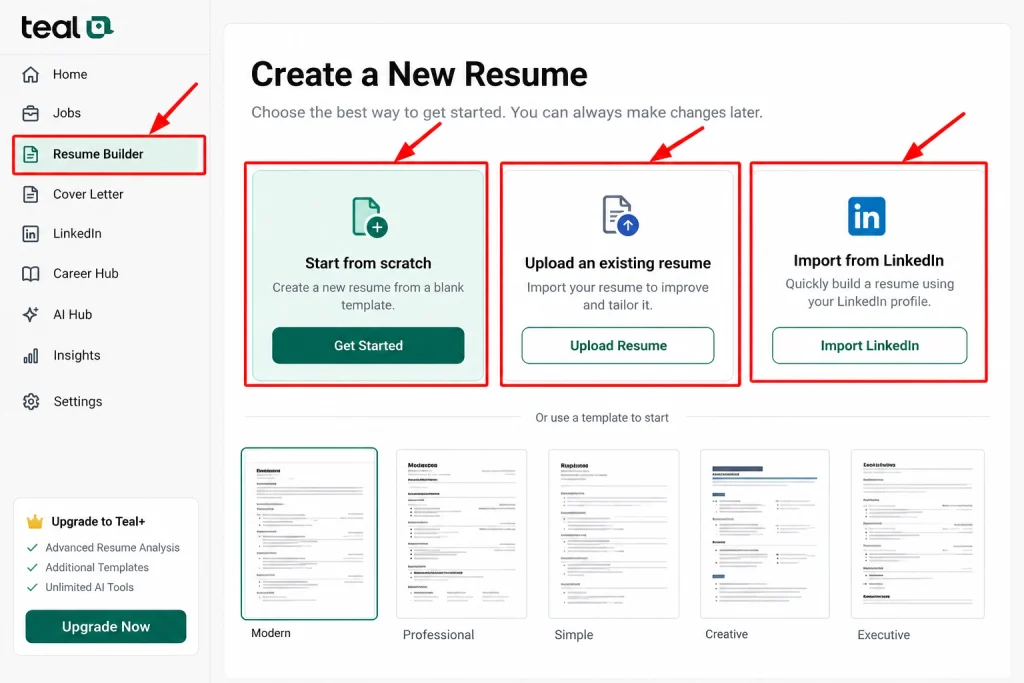
If you already have an existing resume that needs minor modifications, uploading it may be a good idea. But if the resume needs to be completely rewritten, then starting from scratch might make more sense.
Add Your Work Experience
As the next step, write about your work experience. Make sure to include your position in the company, the name of the company, dates of employment, and achievements. Do not just highlight your responsibilities at work. Give specifics about what you accomplished.
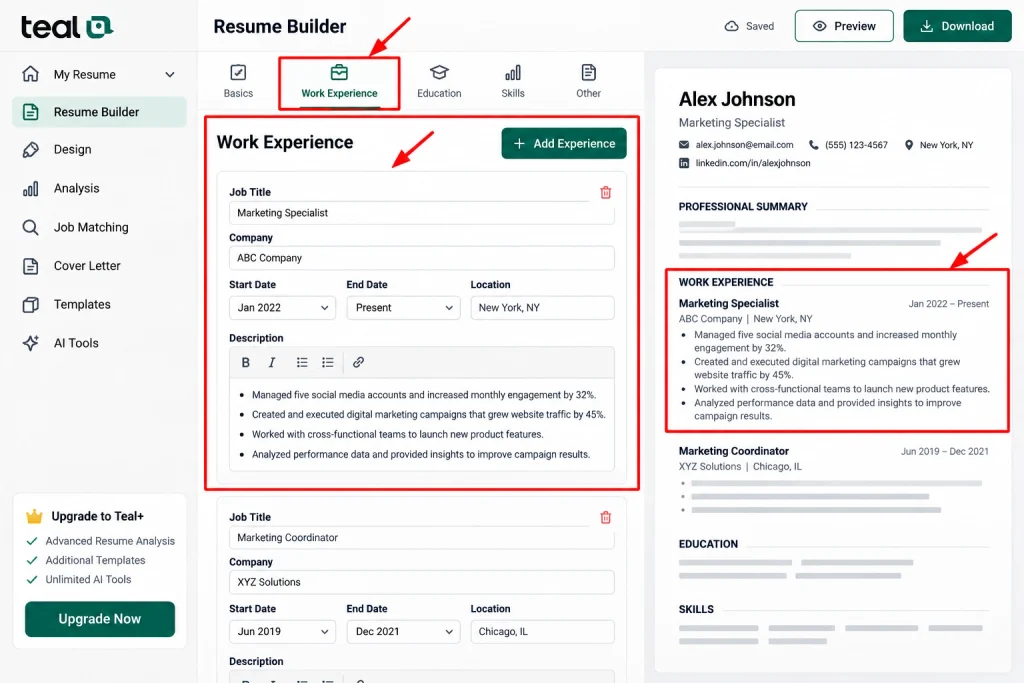
For example, instead of saying: Managed social media accounts, you should say: Managed five social media accounts and increased monthly engagement by 32%.
The second example helps the reader understand exactly what you did and what results you achieved.
According to Teal, it is advisable to write in detail about your work history first. This is because it will help you later to write shorter resumes which will refer to different jobs.
Add Skills and Other Resume Sections
Now, ensure that you finish the rest important sections in your resume.
These may include your:
- Professional summary
- Skills
- Education
- Certifications
- Projects
- Volunteer experience
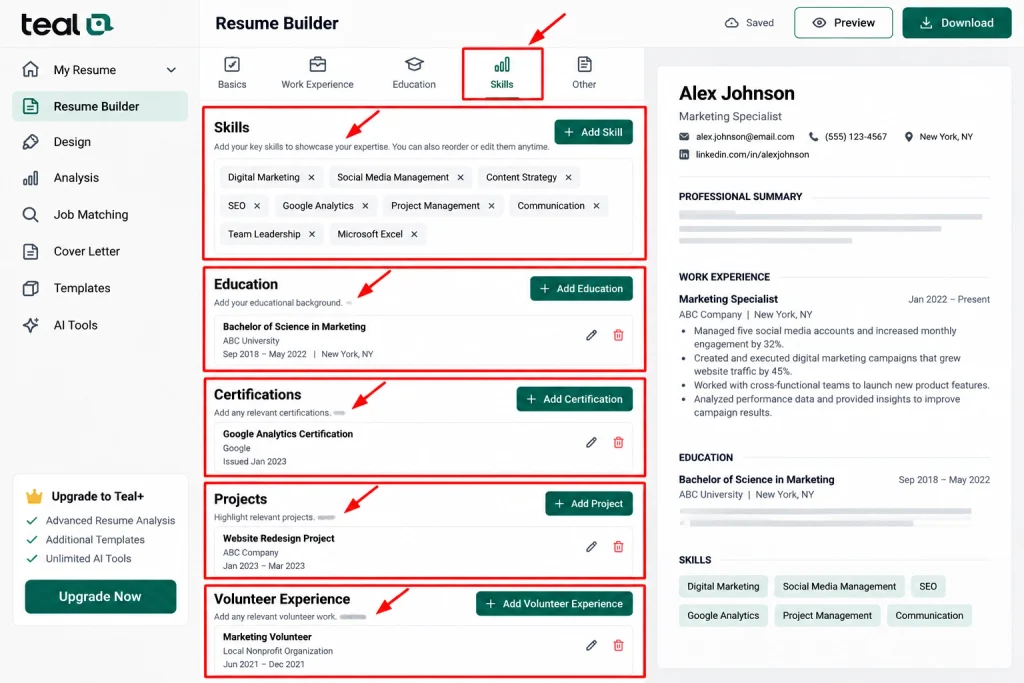
Include only those sections which help in the better job search. For instance, a student or a fresh graduate can increase the education part and projects section. However, a skilled person in the field may emphasize on work achievement.
Also, double check everything before proceeding with the next step.
Improve Your Resume Bullets
Effective resume bullets are able to highlight one’s value right away. Therefore, make sure to invest your time in enhancing vague or weak bullets.
Start each bullet with a powerful action verb and then explain the action and, if possible, indicate if there are any results.
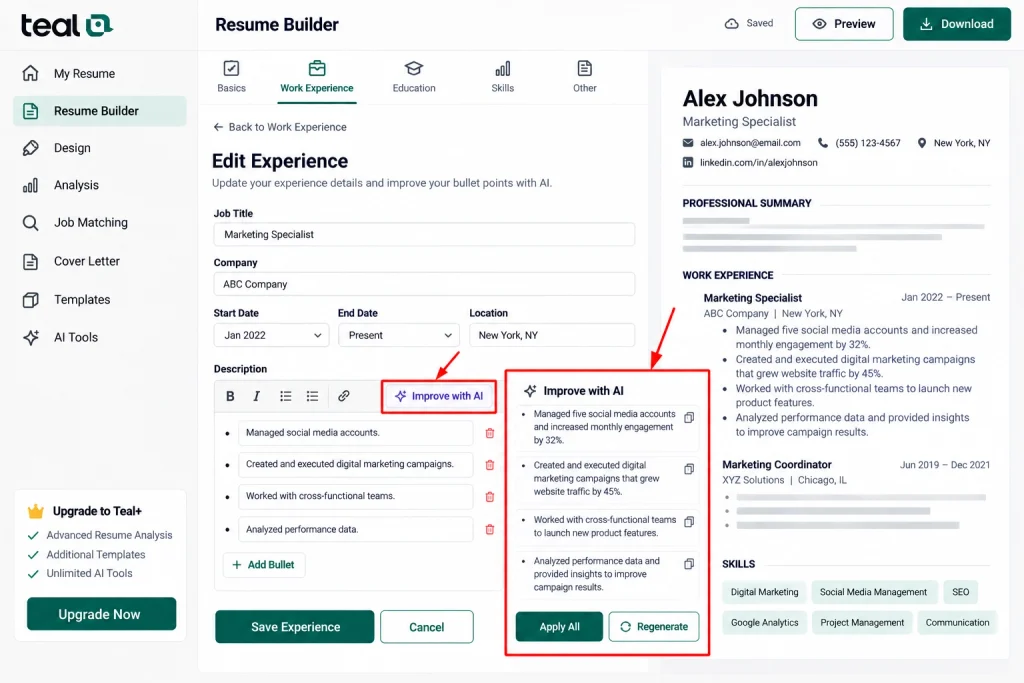
Furthermore, Teal offers tools to improve your resume bullets and create more effective wording.
Ensure that you do not agree to all suggestions blindly. Your resume should reflect your individual voice with every line being a truthful representation of your past experience.
It may also be helpful to include numbers in your work history. For instance, figures can refer to the increase in sales, savings, size of the projects, number of customers, and savings in time, etc.
Add the Job Description
This part of Teal is among the best.
To use this feature, find a job you want to apply for and upload the job description into Teal. The platform compares the skills required for the job to those you possess as stated in your resume.
As a result, you will be able to identify the missing expertise needed to improve your resume.
One job posting may ask for:
- Project management skills.
- Client communication skills.
- Data analysis skills.
- Excel skills.
- Team leadership skills.
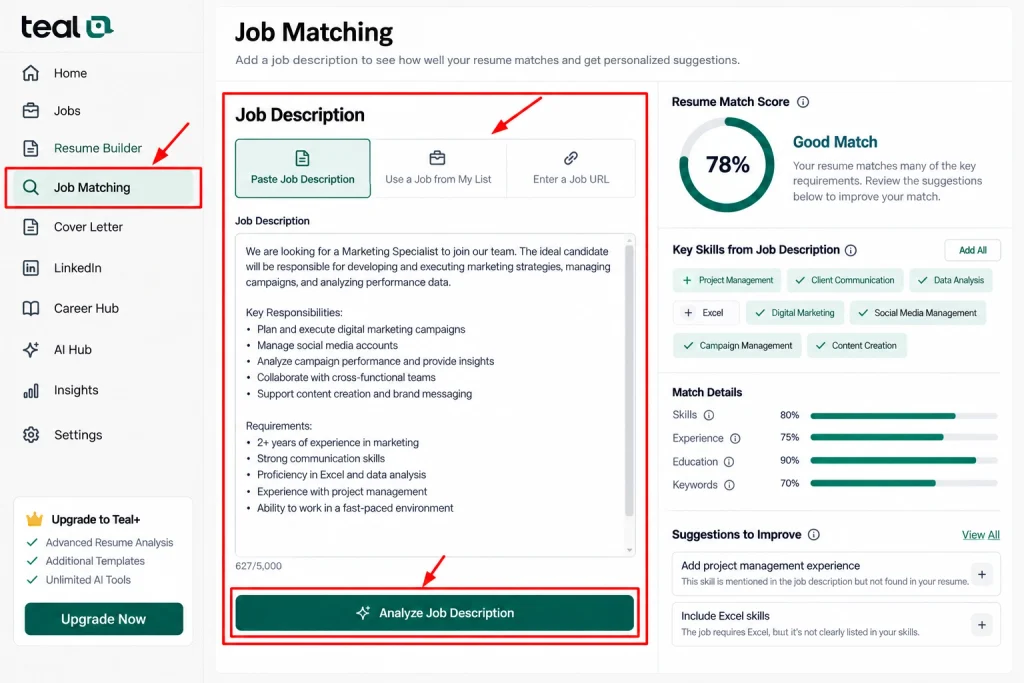
If you were able to fulfill these requirements but the information is not present in your resume, you will need to modify the document accordingly.
However, avoid adding keywords just to raise your match score. Only mention skills and experience you possess.
Check Your Match Score
Once you have added the job description, review all files related to the matching results.
The Teal platform has a useful tool that will allow you to check how your resume fits important features of the given position. The system will also give you insight into the keywords and skills you need to emphasize more. So
You should remember that the data should only be used for reference.
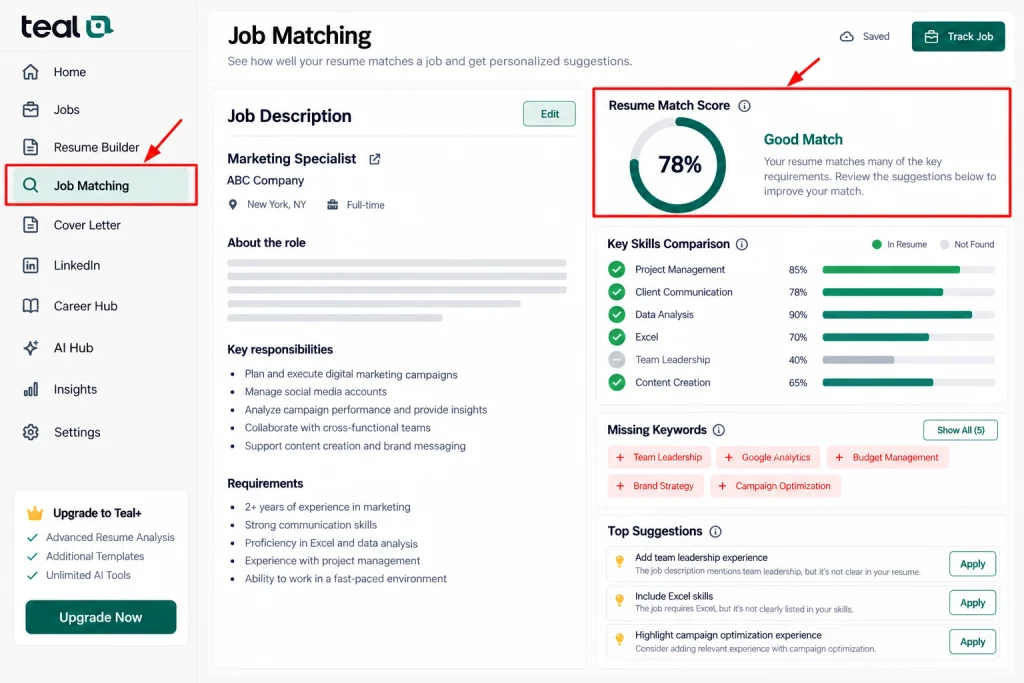
Simply, a high score should not be the reason for expecting a job interview. On the other hand, low scores should not be viewed as a guarantee of failing the recruitment process. Instead, one should analyze the proposals and check if they correctly assess his or her qualifications.
Choose a Resume Template
Once your content is ready, open the Designer section. Here, choose a resume template and modify how it will look. Teal offers some free templates currently; other design options could be found under Teal+. Teal Knowledge Base.
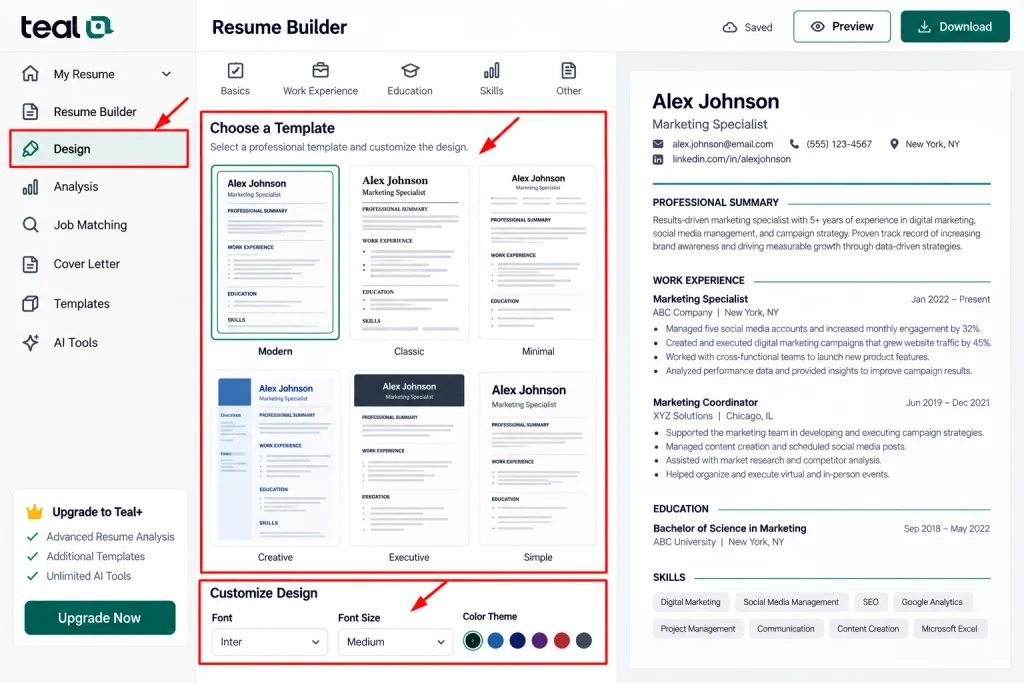
Stick to a simple and professional design. You want your resume to be easily scannable.
Along with make it free from too many colors, graphics, or funky design templates. A simple design will provide ease for both people and your applicant tracking systems.
Review the Final Resume
After having prepared your CV, read it from beginning to end.
Look for any mistakes and check for missing important dates, redundant information, and ambiguous sentences. Also, ensure your contact details listed in it are correct.
Then check the CV again against the job description.
Ask yourself:
- Does the resume focus on the right experience?
- Are the most important skills easy to find?
- Are the achievements clear?
- Is everything accurate?
- Is the formatting consistent?
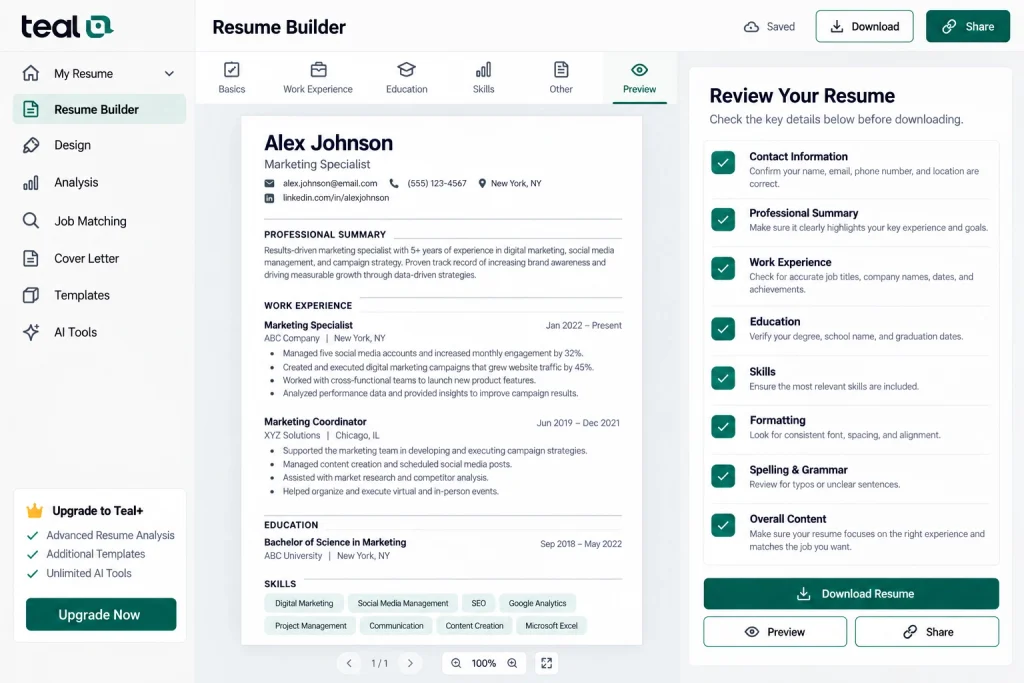
These last steps can help you avoid any mistakes in front of your employer.
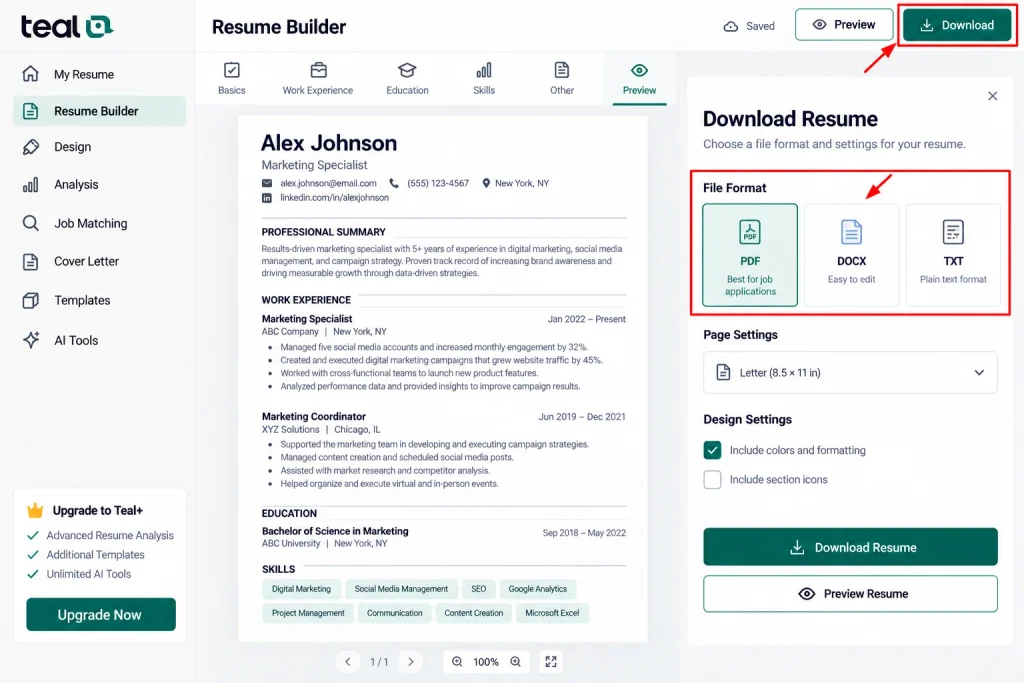
Download and Use Your Resume
Once you finish the writing process of your CV, you would be able to upload it and move to the next part of your application. The applicant may also have to write their introduction and for that purpose is could be beneficial to prepare a cover letter which corresponds to their resume and desired position.
As per Teal Resume Builder, there’s no limit on resumes created or downloaded by its users for free. This means that unlike Teal+, which gives its subscribers advanced resume tools like analytical and additional business templates, Teal does not charge them.
As of now, the following prices for Teal+ have been stated $13 a week, $29 a month, and $79 a quarter in October 2026. Teal accepts all major credit cards and Google Pay as payment options. Teal also has its Knowledge Base if you need any assistance.
Please note that the prices mentioned above can change, so make sure you look at Teal’s pricing page before making the payment.
Final Tips for Using Teal Resume Builder
Using Teal effectively involves using it to organize your real-life experience. Avoid including irrelevant keywords in your resume.
Instead, you can maintain one thorough career record that you can use as a base for many resumes.
It is important to check the suggestions made by the AI system. It is possible to use the suggestions to improve the wording but make sure that the facts and your voice stay your own.
Overall, this process can be summarized in the following steps:
Create your account → add your experience → improve your content → add a job description → check the match → choose a template → review → download.
Using the Teal Resume Builder is a good way to systematize and simplify the process of creating a resume.