
Giftster is a free online tool for creating a wishlist and sharing gifts. You can create wish lists, add items from different stores, share lists, reserve gifts, check off gifts you’ve purchased, create groups, and do Secret Santa exchanges. Giftster allows you to create public wish lists for weddings and baby showers.
Unlike a traditional store registry, you can add gifts even from stores that don’t have a registry. Giftster’s aim is to help people with creating gift lists year-round, meaning people can use the same group for special occasions like birthdays, holidays, and Christmas.
This article will provide you with an overview of how Giftster works, and what you need to know before using it.
What Is Giftster?
Giftster is a digital gift list and registry platform. Its main purpose is simple: help people share what they want while making it easier for others to buy the right gifts.
You can use Giftster for:
- Birthday wish lists
- Christmas gift lists
- Family gift sharing
- Secret Santa
- Wedding registries
- Baby showers
- Personal gift ideas
- Private lists
Giftster estimates it has over three million members and its service can be accessed online via iOS as well as Android mobile applications.
Another interesting feature of Giftster is that it does not limit the user to choosing a particular online retailer. You can create lists of gifts from different websites.
How to Create a Giftster Wish List
First, sign up for a free account on Giftster, and then sign into your Giftster account. You will then create your registry and name it.
Giftster allows you to have shared, public, and private lists to use.
Once the list is created, it is time to put items on your list by selecting the option for gift add. The gift add screen will allow you to enter the name of the gift and additional information about the gift such as:
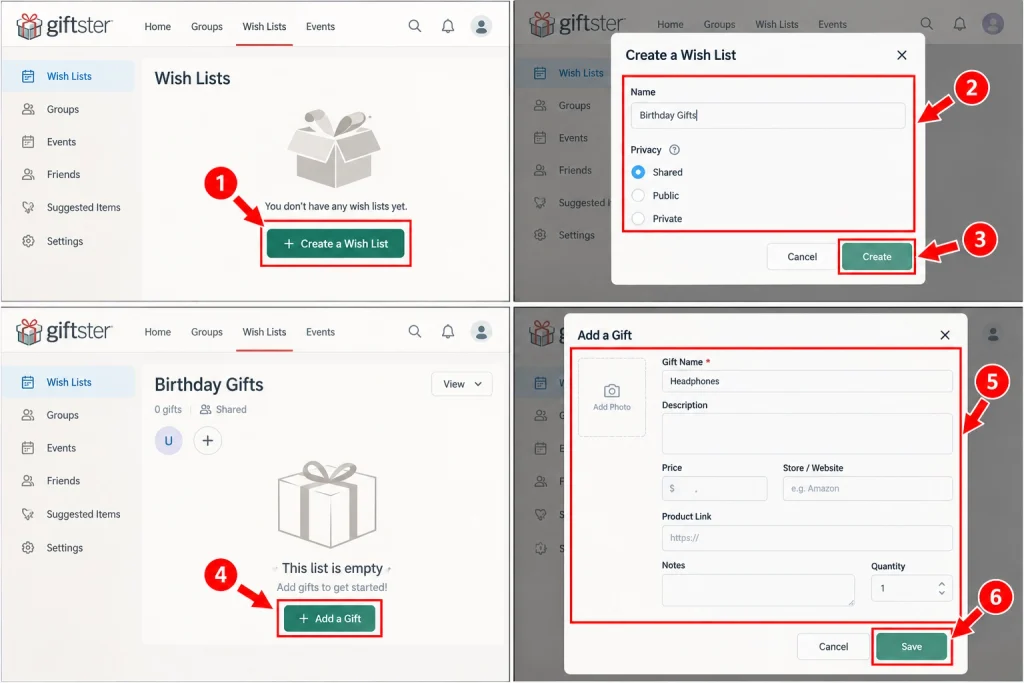
- Product description
- Price
- Store or website
- Product link
- Notes
- Quantity
Only the name of the gift is required so this process is very easy.
Use Giftster Fetch to Add Items Faster
The Fetch feature on Giftster is a great aspect. You may copy the product link, and Giftster will be able to place it automatically on your list with all the product details filled in.
This allows for saving time as many details will be filled automatically rather than typing all the details in yourself. This feature can also be used in different countries to add to your Giftster account.
In addition, there are other ways such as browser plug-in options for computers and phones to add gift suggestions.
How to Create a Giftster Group
A Giftster group is useful especially when you need family or friends to share lists with one another.
For example, one family can create a group and keep on using it on an annual basis. Members can view the lists of one another and make use of them while shopping for birthdays and holidays.
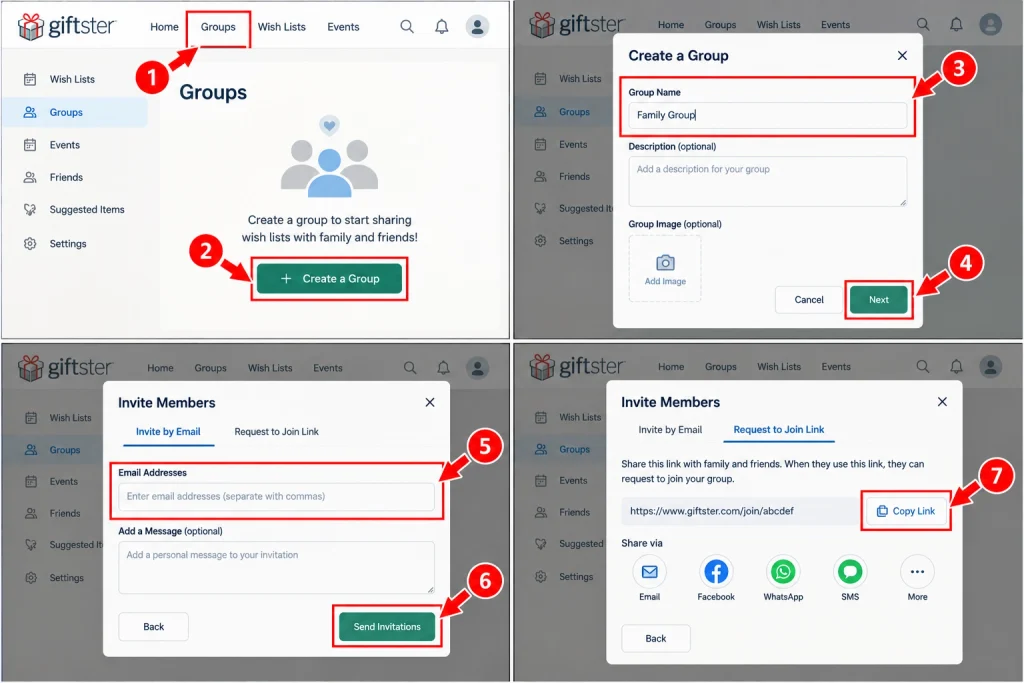
In order to create a group you have to do the following:
- Sign in to Giftster.
- Click on Groups
- Select the create group option.
- Identify the name of the group.
- Invite the group members.
- Save the group and email invitations out.
Giftster allows you to send out invitations through e-mail and gives you another way of sharing the request to join link which is helpful if you want to invite someone using text message or group chats.
You can have two or more people sharing lists on a group while secret santa must have at least three people approved on the group.
How to Share a Giftster List
Giftster allows users to share their lists in a few different ways.
For families or smaller groups, shared privacy is likely the best option. With this option, group members are allowed to view all of each other’s lists.
For larger audiences, a public list is created. This allows a user to share the list link via email, text, social media, or events. A QR code can also be created for a public list.
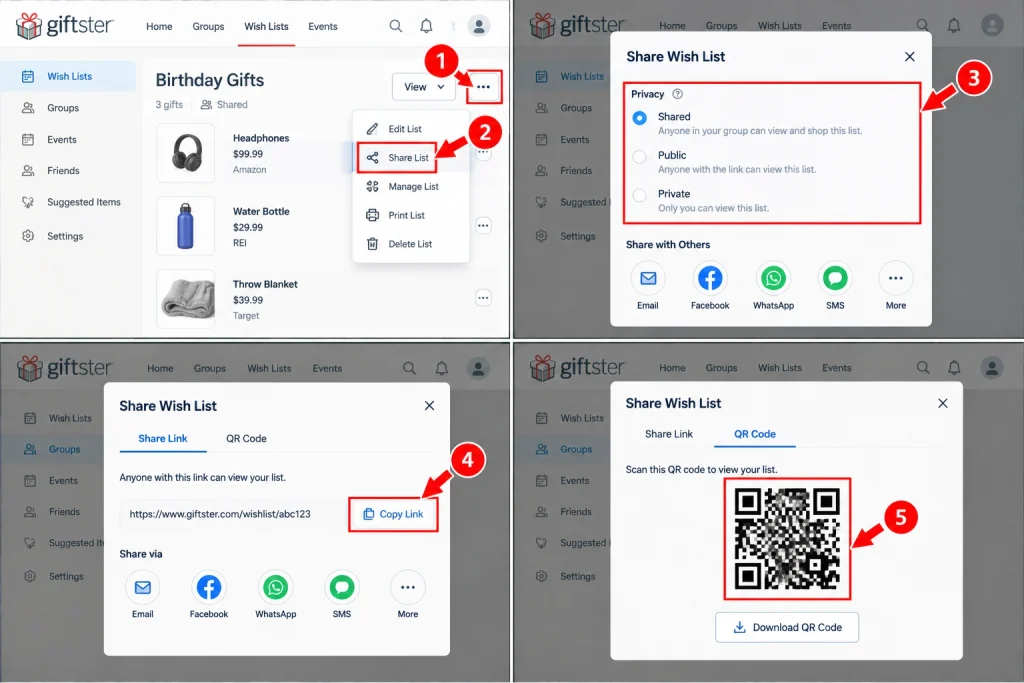
Public lists can be very helpful for weddings, baby showers, and more, letting invited people view the list and reserve or mark items.
When creating lists for private purposes, a private list option may be used. This means only you have access to your own private list, allowing you to save gift ideas for yourself or things you want to buy.
How Giftster Prevents Duplicate Gifts
If you want to avoid duplicate gifts, a fantastic reason to use Giftster is the reservation and purchase feature.
Let’s say three relatives see the same headphones listed. Without Giftster, each one might purchase the headphones.
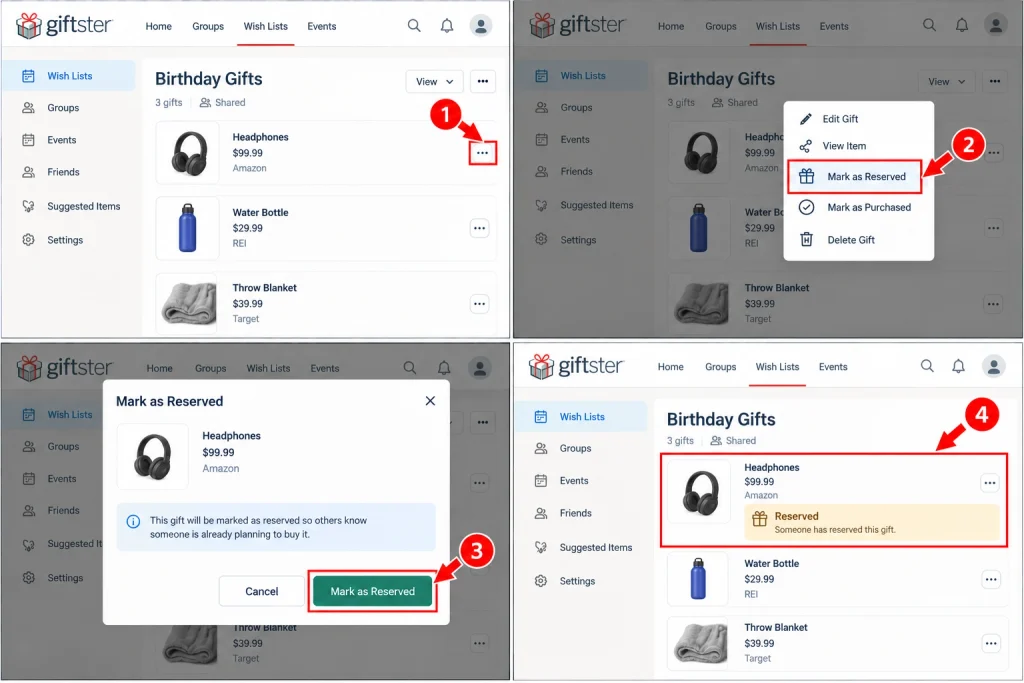
However, Giftster allows one individual to mark the item as reserved or purchased. This feature tells others who are shopping for gifts that the item is already being purchased by someone else. And the best part is that Giftster will keep all purchase info hidden from the owner of the list, maintaining the element of surprise.
This is particularly helpful if you are buying gifts for someone in a large family.
How to Add Gift Preferences
Simply knowing what is on someone’s wishlist does not guarantee that you have all the information you need.
For example, it may be that someone wants a certain clothing type without specifying the exact item they want. Giftster allows them to enter gift preferences, which provide further clarification.
Gift preferences may include any number of features, such as:
- Sizes of clothing
- Preferred colors
- Hobbies
- Interests
- General ideas of gifts
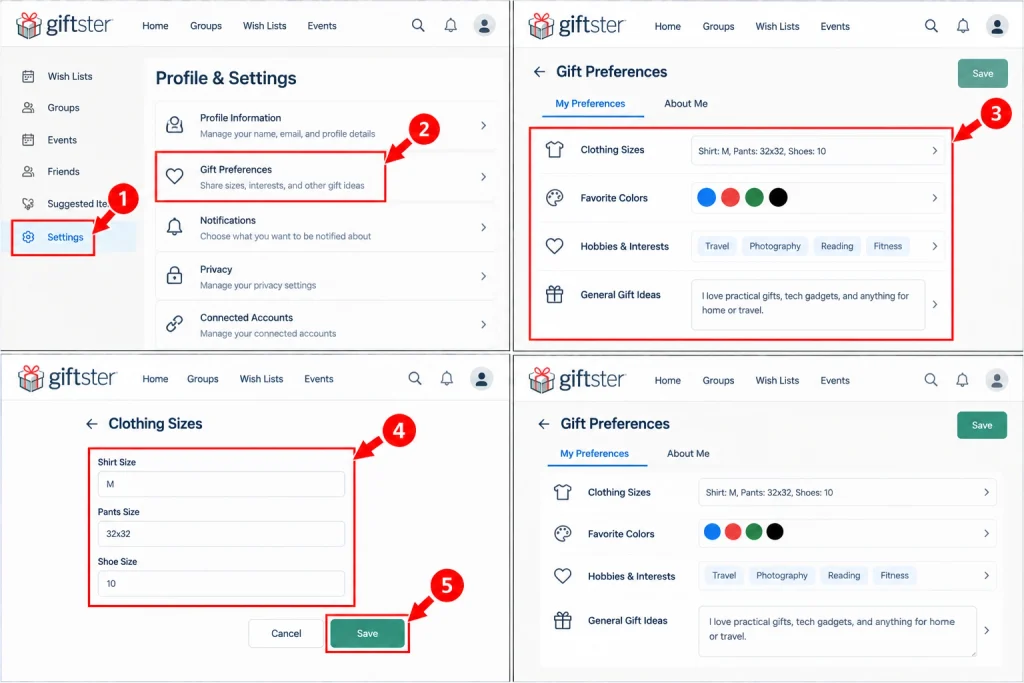
These descriptions can assist a gift giver in making a more appropriate choice of gift even if that specific gift is not found on the wishlist supplies provided by the recipient.
How to Use Suggested Items
Giftster has one more special feature called the “Suggested Items”.
Using this function, the members of the group can add gift ideas to another member’s wish list without that item being included in the standard view of the wish list. However, other members of the group will be able to view the suggestion.
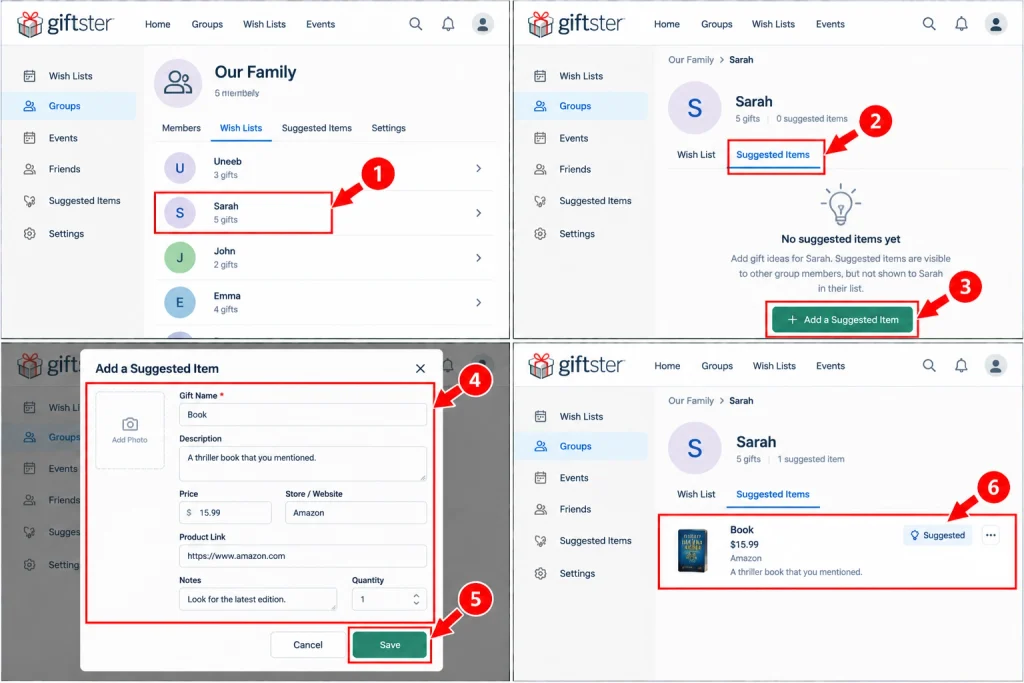
This option is especially valuable because it allows others to help a group member by adding an appropriate item.
Suppose a brother mentions that he wants a certain book, you can enter it in under suggested items. Thus, another group member will be able to see it, and decide if he or she wishes to purchase the particular book for him.
How to Use Giftster for Secret Santa
Giftster is an application that allows you to conduct your Secret Santa exchanges.
The Secret Santa function is available on the Giftster website. Currently, Giftster’s help desk information indicates that the drawing is done on the Giftster website as opposed to directly using the mobile device applications.
To start a Secret Santa:
- Create or use an existing Giftster group.
- Make sure there are at least three approved members.
- Open the Secret Santa section on the group page.
- Add the Secret Santa draw.
- Set your rules.
- Add any exclusions.
- Start the draw.
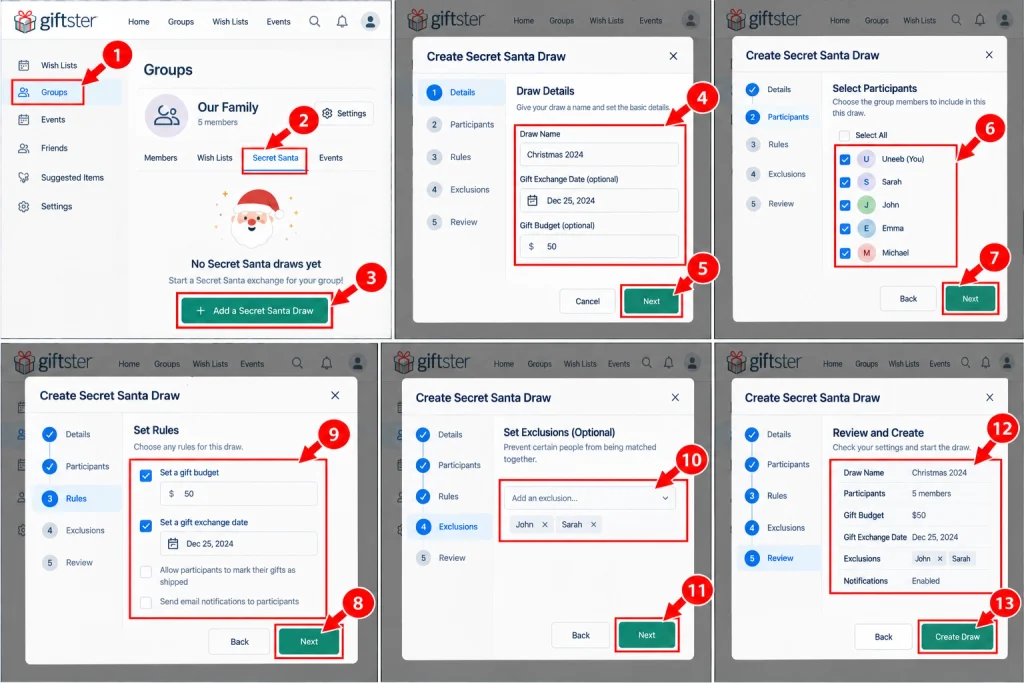
At this point in time, Giftster takes care of the assignments for the participants so that the matches of the participants will remain anonymous, even to the organizing person. Each participant will also be able to access his or her assigned person’s list/gift preferences so that he/she can get the best idea for the gift.
There are exclusions that you can place. Thus, the organizer can eliminate the possibilities for certain participants to get matched with each other.
Once the Secret Santa exchange is completed, you can remove the Secret Santa drawing and continue using your group for other purposes.
Giftster Pricing: Is It Free?
At this point in time, Giftster is free of charge. According to the official help center, it does not impose any fees for the service.
As a result, Giftster is different than some other registry programs that charge fees or take a cut from purchases made through them.
Remember, however, that the primary purpose of Giftster is as a list and gift management service. When you click through to a retailer to make your purchase, the retailer will charge you its own prices, plus shipping, taxes, etc.
Giftster does not require you to purchase the product from a specific store. You can simply add products from various retailers and websites.
Giftster’s Main Features at a Glance
The important features of giftster are:
- Wish Lists: Create lists for birthdays, Christmas, specials, or personal needs.
- Groups: Connect family members and friends to share the list.
- Fetch: Add product information using a web link with less typing.
- Public lists: Share your list with more people.
- Private Lists: Keep your gift lists private.
- Gift preference: Add your size, favorite colors, hobbies, and interests.
- Reservations: Prevent double purchases.
- Secret Santa: Organize virtual gifting with secret name assignment.
- Suggested items: Allow your group to add items to someone else’s list.
- Multi-store lists: Add items from different stores instead of being dependent on one.
Final Verdict
Giftster is a great option if you are looking for a simple way to manage your wish lists and or gift exchanges. Its best features include shared family groups, wish lists from several stores, purchase tracking, privacy controls, and Secret Santa tools.
The most important thing is that it is free which allows you to test out the main features without paying a subscription fee.
Families probably benefit the most from the group feature. Individuals benefit more from private/public lists. Public lists can be used for registry purposes for weddings/baby showers.
Overall, Giftster is really useful to the extent that everyone in the family or group uses it regularly, and once the lists are created, gift planning is really easy.