
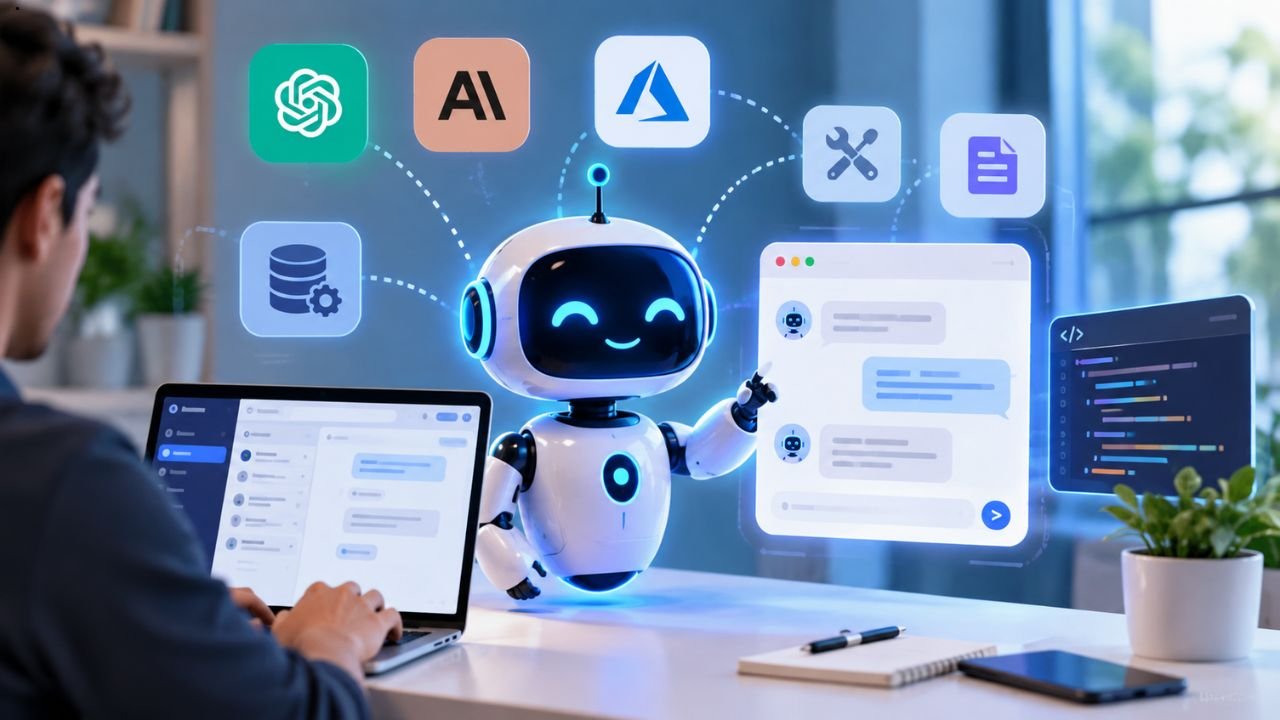
AIbot is going to help you create your own assistant that answers your questions, processes your data, and connects useful tools for you. You can use models from existing providers such as OpenAI, Anthropic Claude, and Microsoft Azure, so you get to publish it as an API or add a chat widget to your website.
Furthermore, the great news is that you don’t have to worry about building everything from scratch — AIbot provides templates and a complete visual workflow that allows you to create your assistant easily. Therefore, while beginners can start working on a simple project, advanced users could connect a database and other services in order to build something more functional.
Here’s a step-by-step guide on how you can create your own AI assistant using AIbot, from choosing templates to testing and publishing your assistant.
What Is AIbot?
AIbot is an artificial intelligence assistant creator that allows users to develop their own customized AI assistants without requiring extensive code writing. It allows the user to link an AI model with instructions input, various tools, and other necessary information to enable the AI assistant to perform tasks other than just answering general queries.
For example, a business can use it to create a customized AI assistant that can respond to customers’ requests about its products. A teacher can also develop an AI study assistant that enables students to revise their coursework, while they engage with the teacher.
AIbot provides several means to utilize an AI assistant including website chat widgets or application programming interfaces (APIs). Additionally, AIbot has various templates available for tasks such as answering questions by reading documents, manipulating spreadsheets, and linking databases.
Here are five ways to use AIbot:
- Customer Support: It can answer common questions related to products, services, or business policies.
- Document Assistance: It can assist users with their uploaded documents to find, locate, or cite the information.
- Data Analysis: It is able to retrieve answers based on a spreadsheet data within the uploaded document to assist the user with their questions, projects, or research.
- Website Help: It can create an assistant that responds to questions about website information.
- Task Automation: AIbot is able to assist with tools and functions for automating specific tasks for an assistant to use.
Ultimately, the results you receive depend on the prompts provided, connected data, selected model, and workflow.
What You Need Before Building an AI Assistant
Before starting, it is important to find out about the specific function the assistant would have to perform. Setting a specific goal beforehand will lessen the difficulty relating to the entire process and prevent you from making unnecessary additions to the assistant’s functions.
For example, if you are the owner of an online store, you can first focus on how the assistant answers queries relating to the shipping or return details. Other functions can be added once the basic program has been completed and is working efficiently.
You should obtain the following:
A specific purpose: Find out what specific problem the assistant will assist in solving.
AI model account: Find out what provider is available for supporting your assistant and, if necessary, request for API key.
Data: Collect relevant information such as frequently asked questions, product information, documents, etc. that would help the assistant in performing its duties.
Instructions: Provide the assistant with information on its responsibilities, expected tone, limitations, and behavioral expectations.
Publishing platform: Find out what medium involves building an AI assistant website, chatbot, or other supported types.
It is always advisable to start small with the first project as this gives a chance to check the primary functionalities before advancing to more complicated connections.
How to Build Your Own AI Assistant With AIbot
Creating your unique AI assistant using AIbot is more enjoyable when you use a step-by-step process. There are templates for various functions one can select with the aim of building an all-encompassing assistant. But one can also create a new workflow if the need arises.
Step 1: Go to AIbot and Choose a Template
First, go to https://aibot.how to search for options or instructions for the various templates available. Make sure to select the right project template based on what you wish to accomplish.
For instance, if you wish to create an assistant to answer questions on documents then you will choose a document assistant template. If you wish to create an assistant that responds to questions on your website content, you will use the website question and answers template.
After that, AIbot has a list of some important templates which include the following:
- Document Retrieval Assistant – answers questions from uploaded files.
- Google Sheets Chat – retrieves information from spreadsheets to answer questions.
- Website Q & A – helps users find information on the website.
- Database Chat – links up an assistant with database data.
- Quiz Master – creates quizzes and stores quiz results in a database.
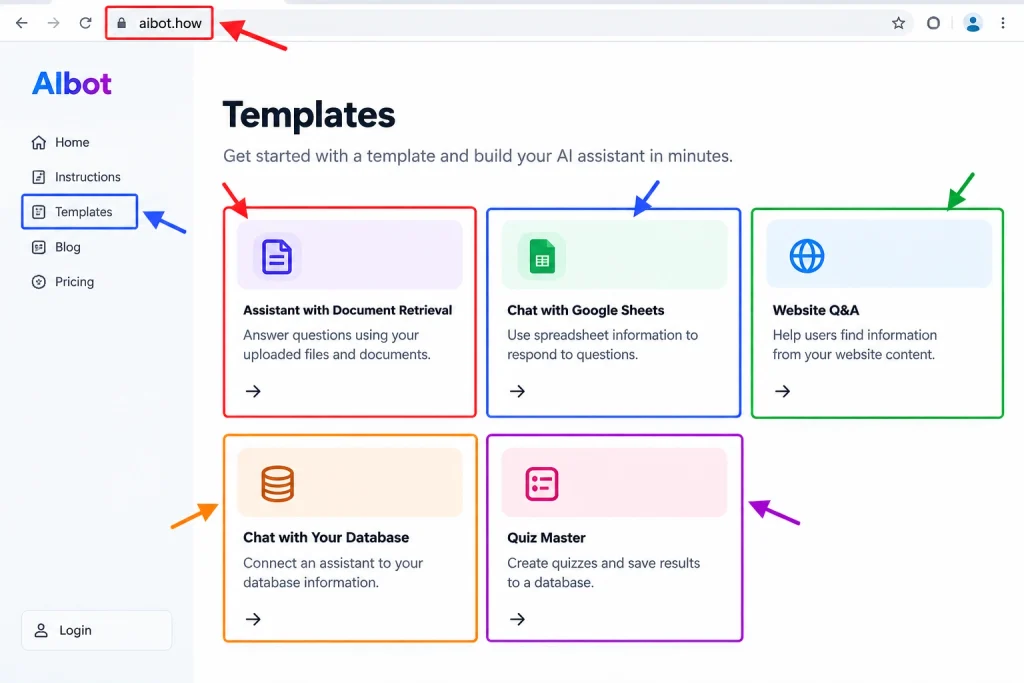
Select one of those templates that you feel best matches your needs, and follow the steps provided in that template to set up your assistant rather than use all features at once.
Step 2: Connect an AI Model
Now, you will link the assistant to an AI model that can be utilized. The AIbot’s setup manual explains the connections made using OpenAI, Anthropic Claude, and Azure.
You may require an API key based on the chosen provider. An API key gives you access to that model and its service through the provider.
Execute the following steps:
- Create an account with your provider if you do not already have one.
- Create an API key according to the instructions given by your provider.
- Access the AI assistant node in your workflow.
- Place the key in the right secure field or connection configuration.
- Choose the model and see the available settings.
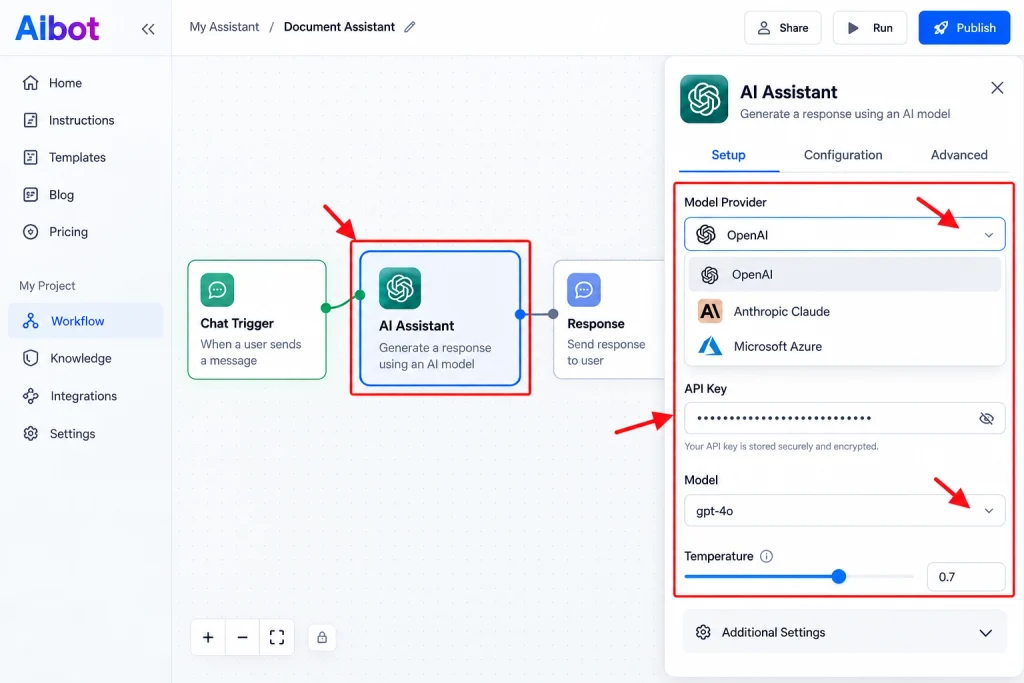
Be sure to confirm the pricing and usage limits established by your provider before continuing. API access might incur fees even if the platform you are using to construct the workflow is free.
Keep your API key safe and secure. You should never expose it in public code or through a screenshot. Use recommended secret storage options.
Step 3: Write Clear Instructions
Your assistant requires instructions that detail how it will perform the work. If your assistant does not follow its instructions, it could provide wrong responses, and the responses may vary greatly from what you wanted.
For example, if you are creating an online retailer’s customer support assistant, you would use these directions:
- Respond to inquiries about products, shipping and return.
- Leverage the relevant business data to respond.
- Keep responses brief and simple.
- If no response is available, indicate that.
- Do not provide invented prices, polices, and shipment dates.
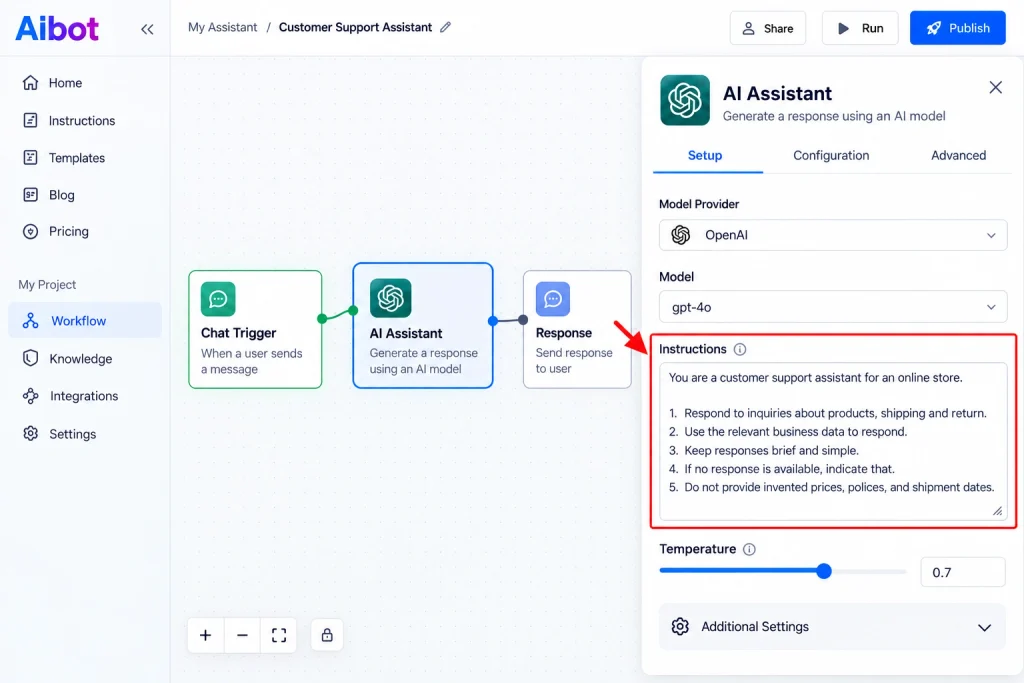
Using these rules will allow your assistant to focus its responses. It will also make it possible for the assistant to service its customers better.
Conduct a test with common questions to see how the assistant responds. Adjust wording and conduct another test as needed if you receive nonsensical responses.
Step 4: Connect Your Data and Tools
Artificial intelligence can answer your general queries but most custom assistants require specific data. Connecting your data and tools is therefore necessary.
For example, a shop assistant will require product information from a spreadsheet, a school assistant to access the lessons notes, while research assistants will need access to a database.
Using AIbot you can connect your assistants with data sources and tools; however, you need to define what functions you wish to use with your setup.
When connecting your data be sure to follow these guidelines:
- Ensure the information being used is up to date and accurate.
- Eliminate information your assistants do not require.
- Ensure your assistant is accessing only the data they are authorized to access.
- Test your assistant to ensure they have access to the correct information before launching them.
- Check any actions made by your assistant that have the potential to change records or send information to others.
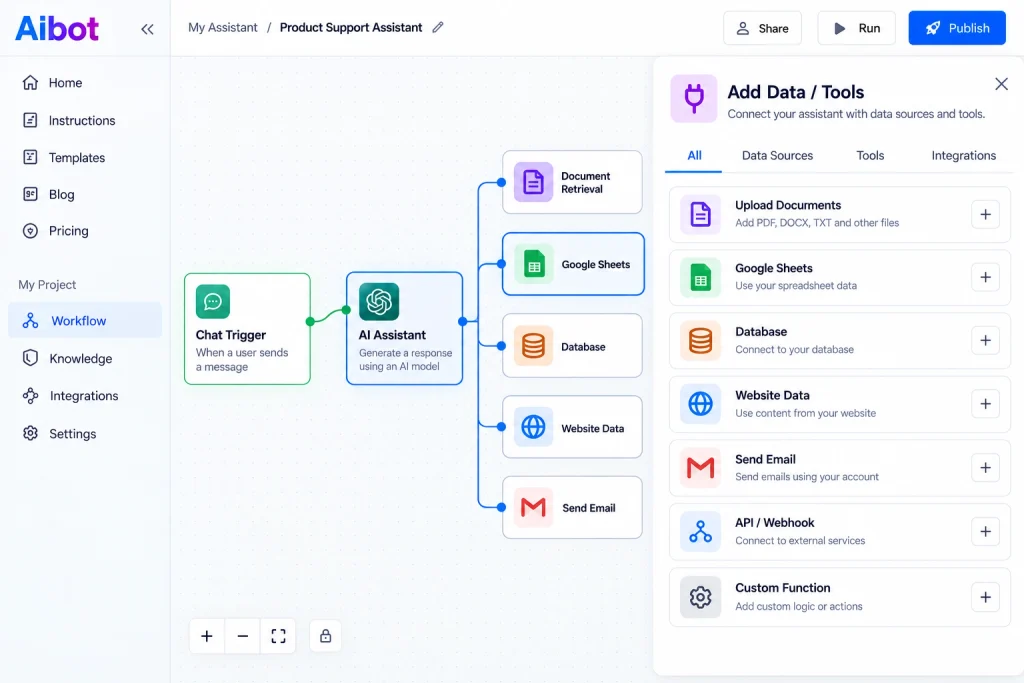
When using a tool that sends emails or changes records, ensure there are strict parameters in place so that if the tool performs its designated function, there is a requirement for human verification prior to executing any major tasks.
Step 5: Test the Assistant Before Publishing
Testing will help you identify problems before real users try to interact with the assistant. Try starting with simple questions, then progress to more difficult cases.
If you were working on a customer support assistant, you would test questions such as:
- What is the return policy?
- How long does delivery take?
- Can you explain the difference between two products?
- What would I do if my question is not covered by your information?
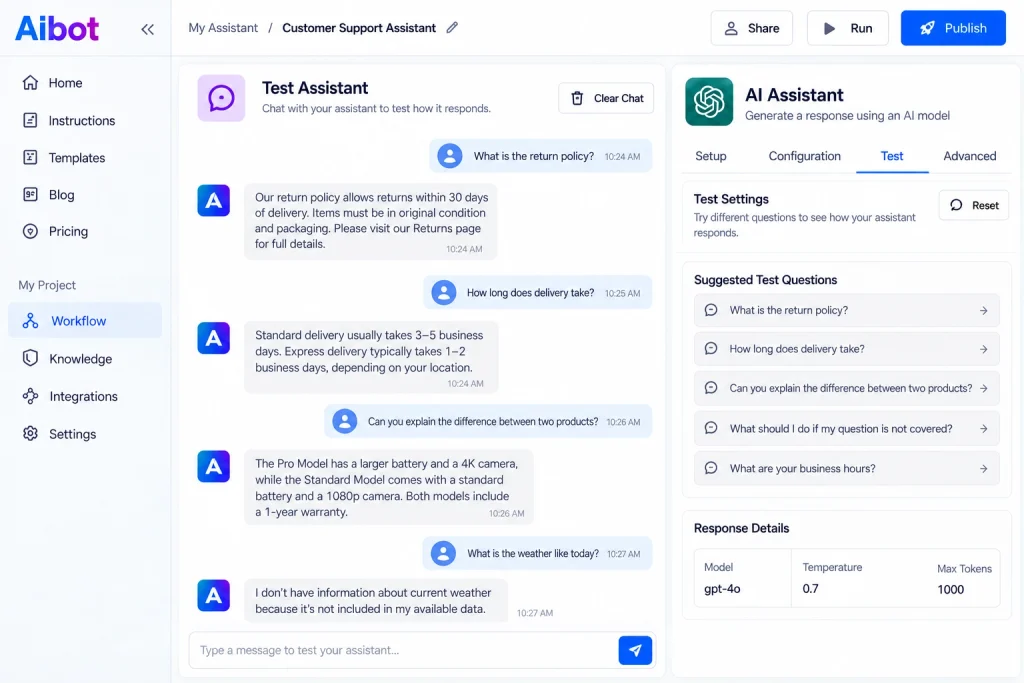
Additionally, ask a question that the data will not be able to answer as well. A good assistant should share with the user that it does not have enough data instead of generating a possible answer.
Next, evaluate if the answers were correct, clear, and relevant. If there is a problem, go back and review the instructions, data connections, and model settings. Then repeat the test.
You also do not just look for the speed of the assistant when answering. Accuracy and safe behavior (and data privacy) matter just as much.
Step 6: Publish Your AI Assistant
After completing the previous steps, you can start to publish your AI Assistant. AIbot has various resources for linking your created bot to other applications, as indicated through the APIs, scheduled jobs, and web chat widgets.
Select the method that works best for you,
For example, if you would like people to be able to interact with the AI assistant through your website, you would select the chat widget option. Here you will find an option for embedding, which will work for compatible website builders and web apps.
Alternatively, if you need another application to communicate with your AI assistant, you may want to use an API connection instead, where your application would send requests into the workflow and use the reply from the workflow as a response.
Before publishing your assistant, make sure that:
- Your assistant is answering questions accurately.
- The necessary connections are functional.
- Your API key and other passwords are secure.
- Your knowledge of usage and restrictions.
- Your published assistant possesses the correct permissions.
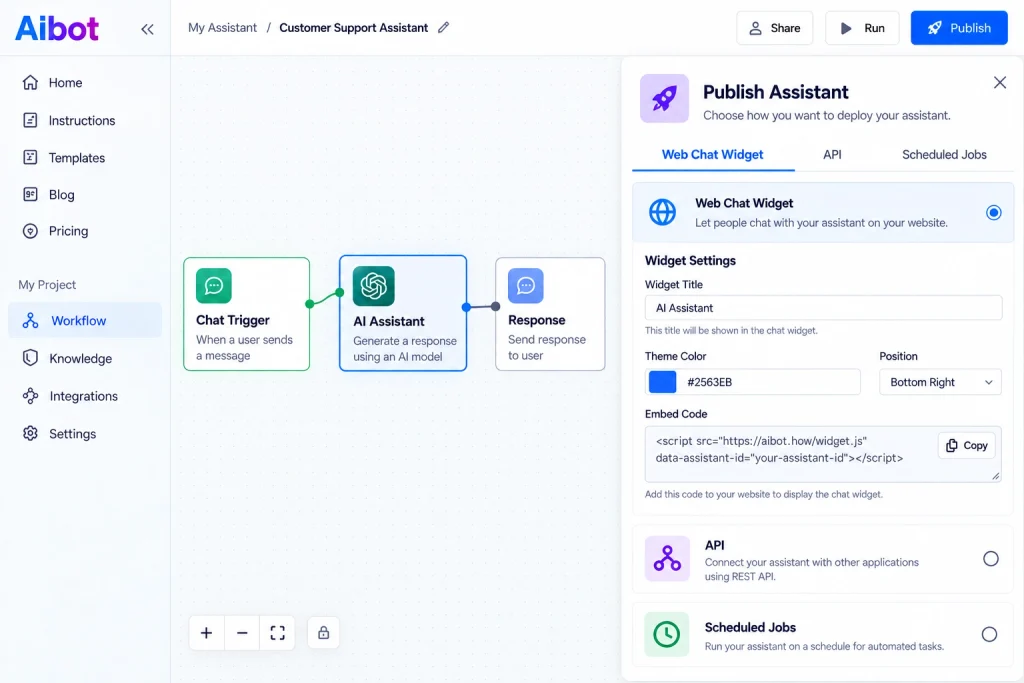
Last, test your deployed version. Sometimes workflows that work in the builder must still be tweaked before they can work correctly on a live website.
AIbot Pricing: Is It Free to Build Your Own AI Assistant?
AIbot is a platform used to create AI assistants with connections to artificial intelligence models and other data sources. The first thing to do is visit its website to see current pricing information, which we were unable to confirm. Therefore, we cannot assume the platform is free or quote any subscription fees. Usage charges may apply for models from such providers like OpenAI, Anthropic Claude, or Microsoft Azure, which you will need to pay depending on which model you will use. Hence, check the costs for using the platform and its models before deciding on your plan.
Common Mistakes to Avoid
First, do not attempt to create an enormous assistant prior to putting an elementary one on the market. The larger the model, the more challenging it is to detect issues. Rather build the smallest model possible before adding elements one at a time.
Secondly, connections using faulty information should be avoided. A good model can give incorrect results if the source used to provide its information is either broken or outdated.
Do not connect an assistant with too much freedom over crucial devices either. For instance, an assistant capable of sending emails or editing databases must have appropriate limitations and approvals.
Lastly, do not assume your assistant is done just because it has been made available to the public. You must regularly evaluate performance, test new features, and modify the system’s information according to your needs.
Final Thoughts
With AIbot, you can develop your AI assistant very efficiently without creating everything from scratch. You can select one of the templates, associate the appropriate model with it, provide clear instructions, and supply it with the necessary data and tools.
Once that is done, you will need to test your assistant properly, before you publish it using a website chat widget, API, etc.
If you are new to the development of AI assistants, start by developing one simple use case and develop it continually step by step. Visit aibot.how for templates and instructions on setting up.