
To convert YouTube to MP3 legally, one of the most important things to do is confirm that you have the rights to use that audio. Not all YouTube videos are available for legal downloading and MP3 conversion. Copyrighting, consent from the creator, and YouTube policies can each play a part in determining what you can do.
The good news is that there are legal ways to obtain audio from streaming videos. You may use music and video content that you own, content given to you with consent from the creator, or content that the copyright owner has allowed for download. There are also some situations where using music in other places where downloading it legally is an option is acceptable.
The following guide describes how to convert YouTube to MP3 successfully while adhering to copyright policy.
Check the Copyright Before Converting
Always verify the copyright status of any content before beginning the conversion process. A YouTube public content does not necessarily mean that it is free for download.
For instance, a music video can be available for all to view, but the recording may still be owned by a recording company, artist, producer, or other copyright owner.
Hence, the first point is to know if you have the legal right to copy and download the audio.
If the answer is in the affirmative, you may proceed with a legal means of conversion. However, it is always best to first seek a legal download option.
Look for Content You Are Allowed to Download
Many YouTube users allow others access to their content by creating there videos free of copyright infringement on numerous platforms.
Some of those without any restrictions have the right to upload there content without worry of copyright infringement for instance on Facebook or via another website.
Always read the terms of the license carefully before you download or modify content.
There are a few things to check for.
- Permission from the creator to download
- Any type of license being used by the creator before any content is downloaded
- Audios created by yourself or any videos created by yourself
The permissions granted will vary based upon each creator’s particular license; therefore, don’t assume that anything uploaded under any given type of license can be used freely.
Use Your Own YouTube Videos
The easiest thing legally is to convert your own video.
If you’ve uploaded a video on your YouTube channel and own the content, you might want an MP3 to edit it, make backup copies, or use it on another device.
In this case, you’re already justified in obtaining an audio version since you own the original content.
Steps you need to do are:
- Find your video file on your PC, smartphone, or storage device
- Open it with an established video-to-audio conversion tool (You can use online Video to MP3 converter websites for this)
- Choose the MP3 format
- Choose the audio quality you need
- Convert it
- Store the MP3 in an appropriate folder.
If possible, prefer to use your original video file from your device instead of downloading it from YouTube yourself to keep better control of the audio quality and better omitting steps concerning converting your uploaded content.
Get Permission From the Creator
Alternatively, another legal step is to obtain consent from the owner of the copyright.
This method is applicable when the creator has made public an original work of his/her own, such as a song, podcast, an interview, tutorial, or any type of media. The creator can allow you flexibility to either download the audio and use the audio for your purpose.
Nonetheless, it is imperative that permission be explicit. A statement like “go ahead and use my videos” is not going to necessarily provide all copyright-related information.
For example, the permission granted may cover the following aspects:
- Downloading the audio for personal use only
- Using the audio in a video
- Editing the audio
- Distributing the edited file
- Commercializing the audio
All of these rights are different. Therefore, it is important to understand exactly what the creator has permitted you to do.
Avoid Unknown Converter Websites
Even if you have the legal right to convert the video, you need to consider your security.
Many unknown converter websites could be filled with ads that are difficult to navigate, false download buttons, rootkits, or viruses and other security threats.
Instead of trusting an unknown converter, you can use reputable software that you have downloaded from a safe source. It is also important to make sure that your operating system and security software are always up to date.
You should never input sensitive information in order to convert an audio file.
How to Convert YouTube to MP3 Safely?
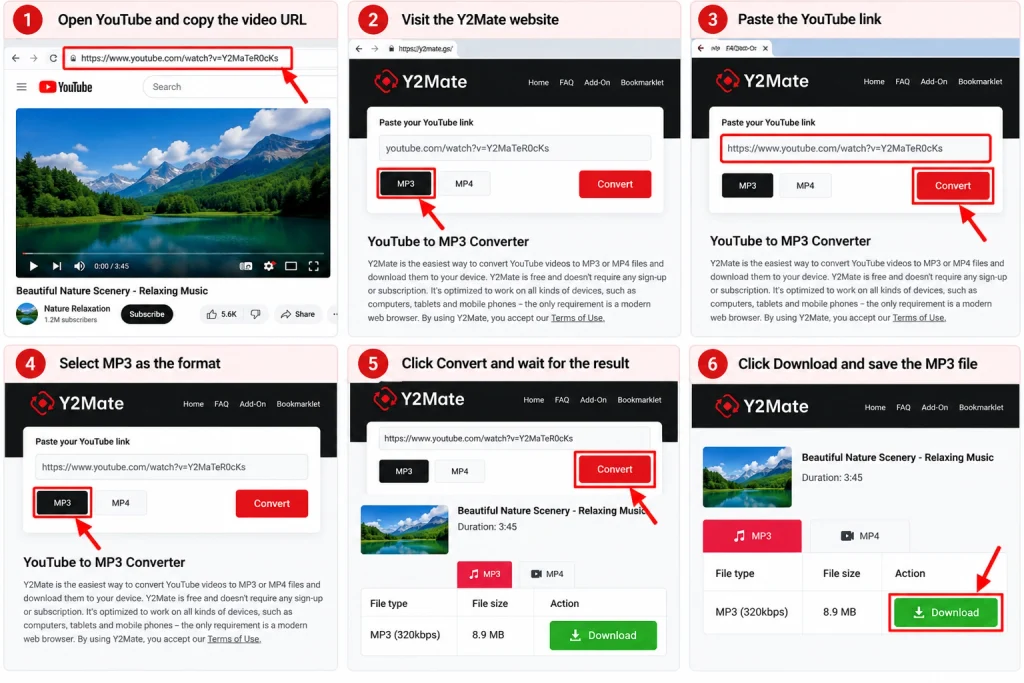
If you are allowed to download any video from YouTube, the easiest way to do that is to use Y2Mate that allows you to convert it into MP3 format in just a couple of simple steps.
Steps for downloading using Y2Mate:
- Go to YouTube and copy the video link you want to download.
- Go to Y2Mate’s website.
- Paste the copied link into the search box.
- Select “MP3” in the “save as” option.
- Choose the audio quality.
- Click download to save your MP3.
Ensure that you have the right of downloading videos from YouTube to MP3 using an online converter like Y2Mate. Always be cautious while dealing with pop-up and ads, and be careful before clicking on any unexpected download button or ad on third-party websites.
Legal Alternatives to YouTube-to-MP3 Conversion
If your only purpose is to listen to audio from videos offline, there are numerous other options available that may be more appropriate than YouTube.
Here are some options to consider:
- Use an official offline listening application.
- Purchase or download the audio from legal sites.
- Obtain the audio from the creator.
- Use royalty-free music libraries.
- Contact the owner of the copyright.
- Convert your own videos to MP3s.
The above steps can minimize issues relating to copyright and also ensure the audio has better quality than YouTube.
How to Tell If a Conversion Is Legal
Make sure to go through this short list of guidelines before converting any YouTube video.
Consider the following questions:
- Do I own the video and its audio?
- Has the copyright owner given me permission?
- Does the license clearly allow downloading or conversion?
- Is there an official download option?
- Am I following the terms of the service I am using?
- Will I use the MP3 only in the way that the license permits?
If you can’t answer all these questions with certainty, assume that you may not have the right to the conversion.
As a result, it is advisable that you get in touch with the copyright owner or go to the official source to find the answer you seek.
Final Thoughts
To convert YouTube to MP3 legally, it is important to make sure that you have the right to the content or if it is your own video, convert the original video to MP3. However, it is better to first check the licenses and utility before using someone else’s video.
If it is possible for you, it is recommended to use the official means or just obtain the audio directly from the creator which keeps everything simple as well as helps in respecting the copyright.
If you are unsure about the possibility of download or conversion, always check the creator’s terms.